Setting up Nginx as a reverse proxy for Node.js App

Okay.. but what is a reverse proxy?

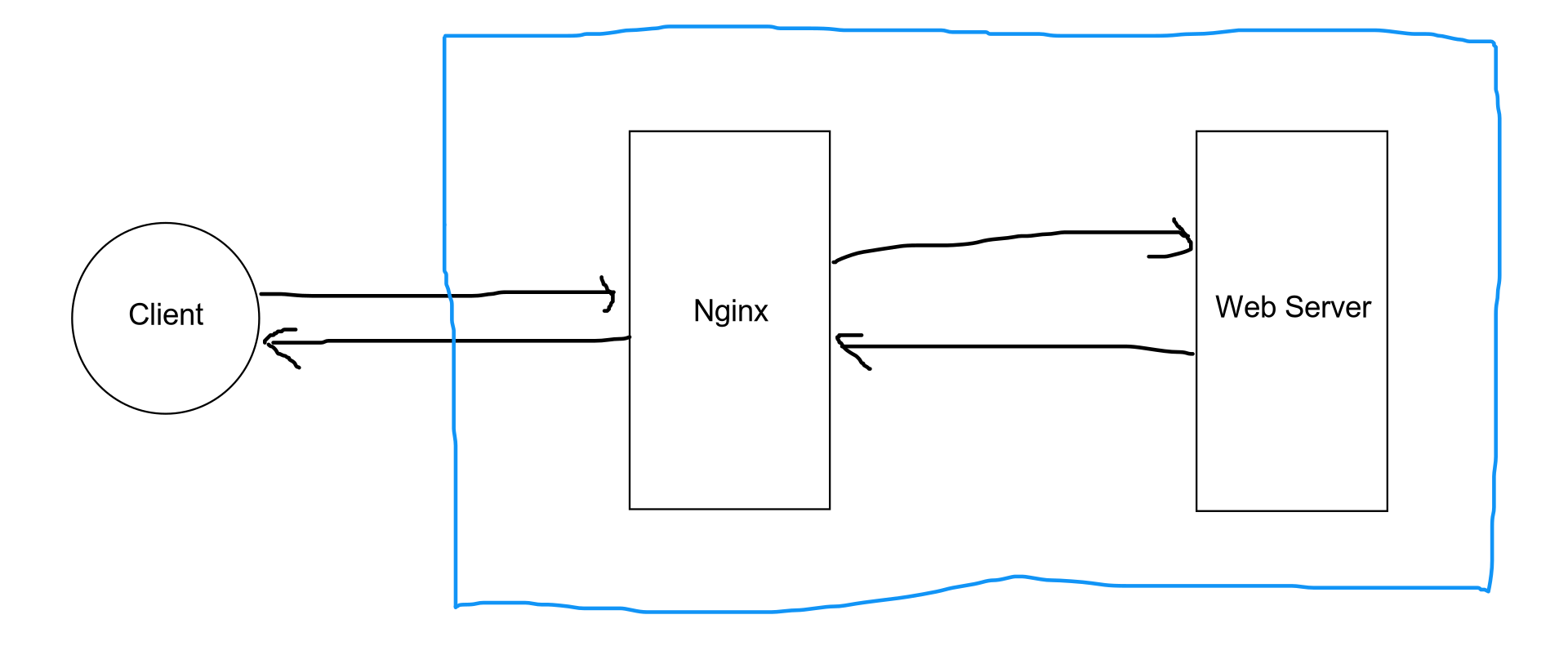
A reverse proxy is a web server that centralizes internal services and provides unified interfaces to the public. Requests from clients are forwarded to a server that can fulfill it before the reverse proxy returns the server’s response to the client.

Nginx is a popular choice to use as a reverse proxy for your node.js application.

Got it. Now let’s set up Nginx

Let’s say your nodejs server is running locally on localhost:3000.

We will set up Nginx to get the request and forward the request to our nodejs server.

Installing Nginx on ubuntu

sudo apt-get update
sudo apt-get install nginx

Configure Nginx

  1. Disable the default, virtual host
unlink /etc/nginx/sites-enabled/default

2. Create a configuration file

cd /etc/nginx/sites-available
sudo nano reverse-proxy.conf

3. Put the following content in the file

server {
listen 80;
listen [::]:80;

access_log /var/log/nginx/reverse-access.log;
error_log /var/log/nginx/reverse-error.log;

location / {
proxy_pass http://127.0.0.1:3000;
}
}

4. Create a symbolic link

ln -s /etc/nginx/sites-available/reverse-proxy.conf /etc/nginx/sites-enabled/reverse-proxy.conf

5. Test the configuration

nginx -t

6. If all good restart the server

sudo service nginx restart

Now go to localhost or localhost:80 and the request will be forwarded to the node.js application.

Congratulations our reverse proxy is successfully setup.

Image for post

If you are interested in System Design also read how to setup Load balancer in your app here:

https://blog.shashi.dev/2021/01/implementing-load-balancing-with.html

Thanks for reading. If you have some feedback, please provide your response or reach out to me on Twitter or Github.

Happy Coding!!!

Comments

  1. Betway Review - Online Gambling - Reviews and Ratings
    Betway online casino software is quite comprehensive, a reliable option for sports punters 카지노 who prefer their money back bet365 more. Betway  Rating: 7/10 · ‎Review by SlotCatalog betway

    ReplyDelete

Post a Comment

Popular posts from this blog

Visualising Your Google Location History

Step 1: Download Your Google Location History First, you need to download your location history data from Google. Follow these steps to get started: Go to Google Takeout : Visit Google Takeout to begin the process. Select Location History (Timeline) : Make sure to select the “Location History (Timeline)” option. 3. Export Your Data : Google will compile your data, which might take some time. You will receive an email once your data is ready to be downloaded. 4. Download the Data : Follow the instructions in the email to download your data. Step 2: Extract the Downloaded File Once you’ve downloaded your data, locate the file and extract it. The location data will be in a JSON file at the following path: takeout-202XXXXXTXXXXXXZ-001/Takout/Location History (Timeline)/Records.json Step 3: Convert JSON to CSV To make the location data usable, we need to convert it from JSON to CSV format. Although you can convert it to KML or geoJSON formats, we’ll focus on CSV for this post. 1.  Clon...

Track stock market information right in your Terminal.

     Introduction: As a developer, I love working with the terminal. The plain, simple, and in my opinion the best way to interact with the computer (also it makes you look geeky). I spent most of my time in the terminal. By now you must have guessed I am a huge fan of the terminal and terminal-based applications. Recently I developed an interest in stock markets and started tracking the stock markets. Since I love working with the terminal I decided to build a terminal oriented application that can help me to track the stock market. Inspir e d by  wttr.in  I build  terminal-stocks  which can provide the stock's current prices, historical prices, and global market summary. How to use terminal-stocks terminal-stocks  is available and can be used without installation. Get the current price of the stock. curl terminal-stocks.dev/ITC.NS Current price of stocks You need to provide the ticker of the stock and terminal-stocks will give you the price inf...

How to mine pancake swap using your Laptop/Desktop

In this post, we will talk about how you can mine pancake swap using your laptop or desktop. What is pancake swap you ask? Pancakeswap is a decentralizaed DEX where you can Trade, earn, and win crypto on the most popular decentralized platform in the galaxy, you can Trade any token on Binance Smart Chain in seconds and you can earn passive income with your CAKE tokens. You can read more about it from  https://pancakeswap.finance/ Get Started! Step I: Getting a crypto wallet You can start with  Metamask  as a crypto wallet. Go ahead and download the Metamask as a chrome extension. Download Link:  https://metamask.io/download.html Once installed let's set up the Metamask account. Metamask Get Started Screen Click on  Get Started  button, and you should see the following screen. Metamask create wallet screen Click on  Create a Wallet  button. Metamask I Agree Screen Click on  I Agree  button. Metamask create password Provide a strong passwo...